An app by AxoLottaLove Read · Play · Keep it honest

Read more. Play often.

Xoreader is a calm reader for your own books, with a shelf of quick word and focus games next door. Speed never shows up without understanding beside it, and every game says how much research is behind it.

Coming soon to theApp Store See how it works ↓
Made for iPhone Works offline No account, no ads
Pond notes

Many salamanders grow up and move onto land. The axolotl never bothers. It keeps its feathery gills for life and stays in the canals of Xochimilco, near Mexico City.

It has another famous trick: when it loses a leg, it grows a new one, bones and all. Scientists study that closely. The axolotl mostly waits for a snack to swim by.

ModeGuided Highlight

The Xoreader loop

Read a little. Play a little. Keep the honest number.

Reading is the main event and the games are quick side quests. Your stats keep speed and understanding together, so the number you keep is the one where the page still made sense.

  1. Read

    Bring EPUB or TXT files, pasted text, web articles or YouTube captions. A soft highlight can set the pace, or switch it off and just read.

  2. Play

    Browse the whole shelf or tap Surprise me. Most games take one to five minutes, and every one is easy to replay.

  3. Check

    Reading rounds end with a few quick questions. A fast result only becomes a record when the understanding came along too.

  4. Come back

    Optional daily missions, XP, ranks and medals. Freezes cover missed days, and nothing nags you to return.

The reader

A calm reader for your own books.

Everything you add goes into a private library on your iPhone and reads offline. Let a gentle highlight set the pace, flash words one at a time, or keep the page perfectly still.

  • Guided Highlight moves a soft highlight at your pace while the whole page stays in view, so you can still glance ahead and look back. It’s the default for that reason.
  • RSVP and Chunk RSVP flash one word, or a few, at a time, with an instant rewind for anything that slipped past.
  • Classic is just the page: no pacing, no timer, always free.
  • Bring your own reading: EPUB and TXT files, pasted text, articles, blog posts and news pages, or a YouTube video’s captions, straight from the share sheet.
  • Make it comfortable with Pond, Deep, Paper or Ink themes, Lexend, Atkinson Hyperlegible or Bitter, and your own font size.

Copy-protected (DRM) books won’t open, and Xoreader doesn’t try to get around that. Paper, Ink, Atkinson Hyperlegible, Bitter and Chunk RSVP come with Pro.

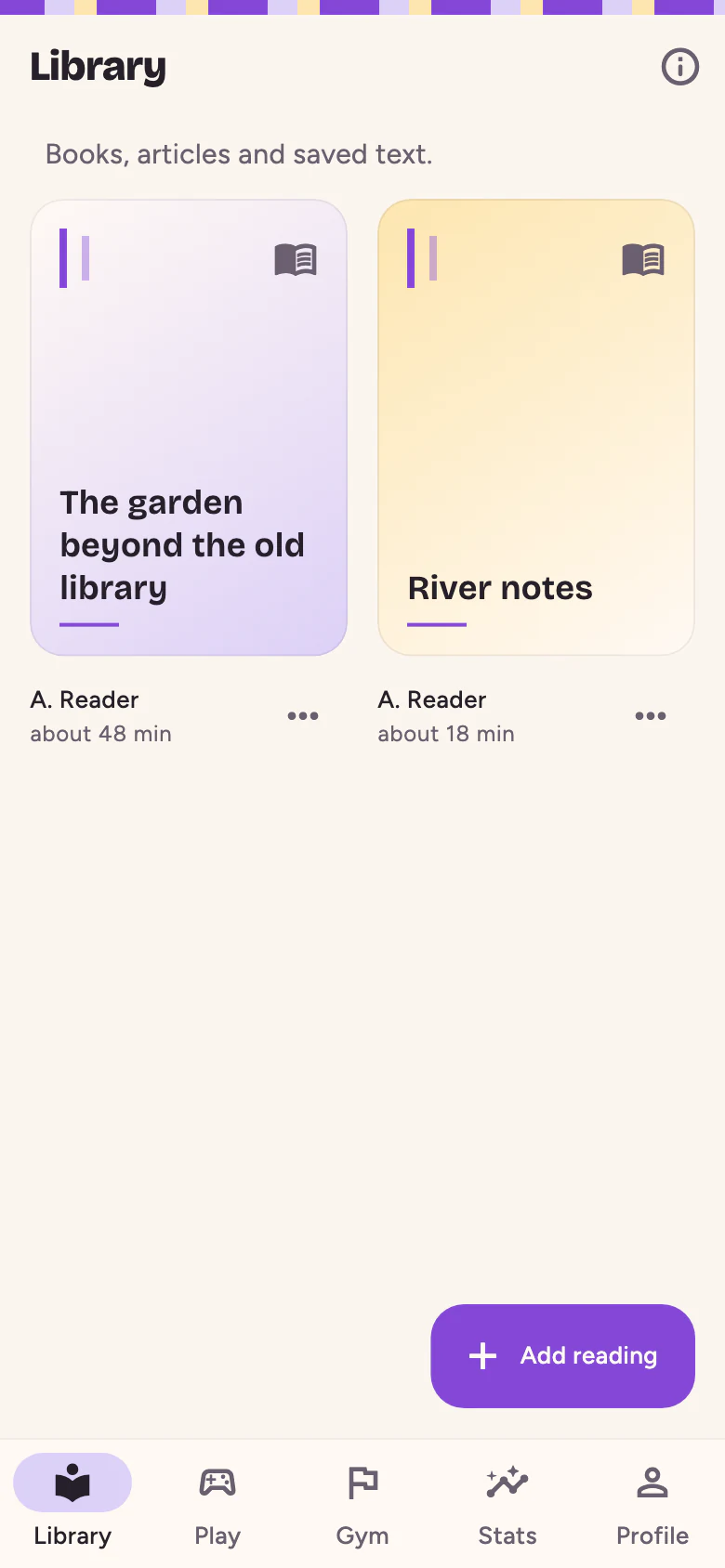
Xoreader's Library tab showing two books, “The garden beyond the old library” and “River notes”, each with its reading time, and an Add reading button.
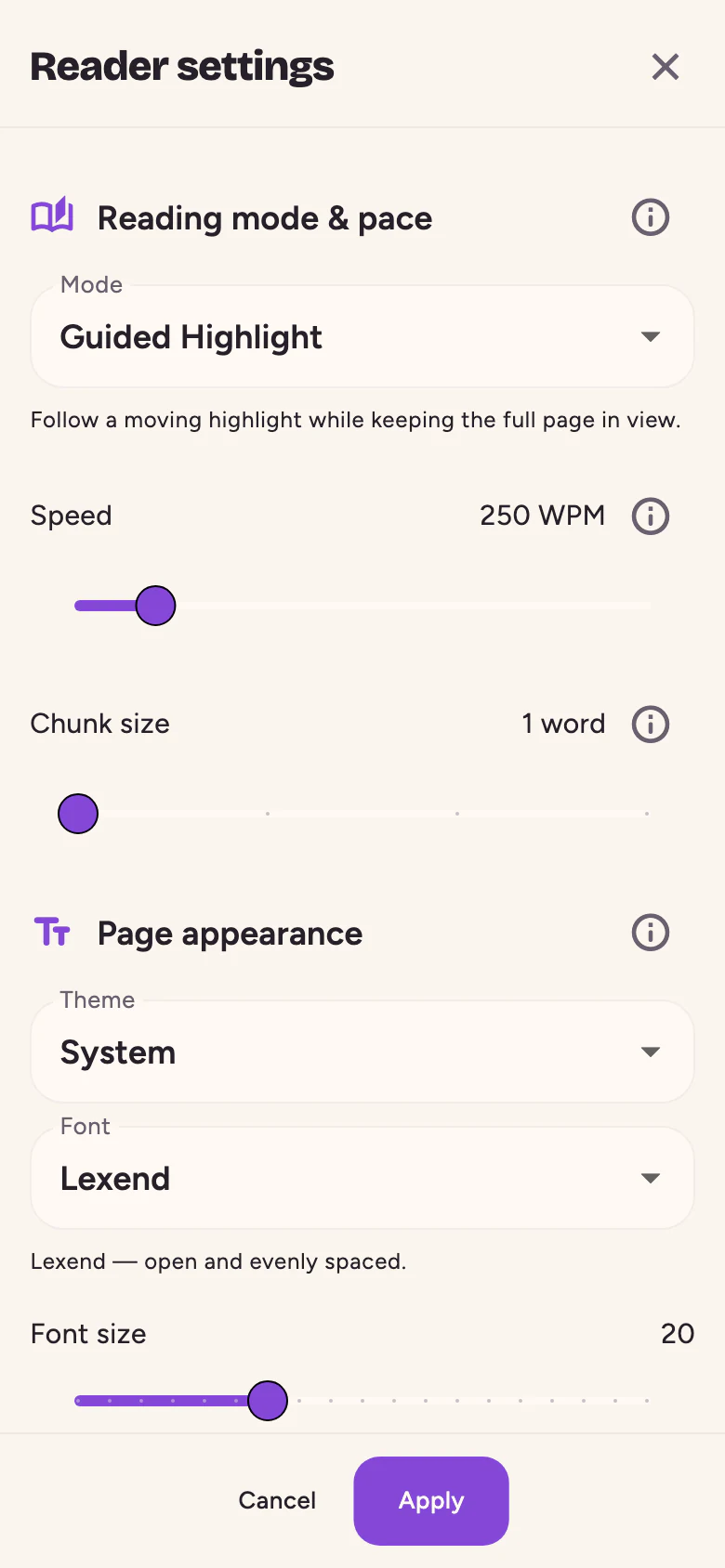
Reader settings with Guided Highlight selected, a speed slider at 250 words per minute, a chunk size slider, and the theme, font and font size options.
The Library and Reader settings, as rendered by the app.
The game shelf

Fourteen quick games. No lecture first.

Twelve research-based games for reading, words and focus, plus two sorting games that are purely for fun. Browse everything, replay anything, or let Surprise me pick.

Reading 6 games

  • Timed Reading

    Read a short piece, then answer 5 quick questions.

    Well-supported~3 min
  • Repeated Reading Ladder

    Read it three times, then take on a fresh one.

    Well-supported~6 min
  • Gist Sprint

    40 seconds to get the gist. Then prove it.

    Well-supported~2 min
  • Scan Hunt

    Find the word hiding in the page.

    Well-supported~2 min
  • Column Jumps

    How narrow can the columns get before it stops making sense?

    Promising~3 min
  • No-Look-Back

    The words vanish behind you. No peeking back.

    Traditional~3 min

Words 3 games

  • Word Sprint

    Word or not a word? Answer before the clock runs out.

    Well-supported~1 min
  • Word Bank

    Flashcards for words you actually met.

    Well-supported~3 min
  • Phrase Flash

    A phrase flashes. Which one was it?

    Promising~3 min

Focus 3 games

  • Schulte Table

    Tap the numbers in order, fast. Eight styles to master.

    Traditional~1 min
  • Visual Span

    Letters flash by. How many can you catch?

    Promising~3 min
  • Peripheral Flash

    Watch the center, catch the edge.

    Promising~3 min

Just for fun 2 games

  • Color Sort

    Four colors. One Skip. Sort each word before the round ends.

    Just for fun30 s
  • Category Sort

    Four surprise categories. Find where each word belongs.

    Just for fun30 s

Some games flash text or shapes quickly. Xoreader shows a health notice before any of them can start, and Gentle mode softens them. Gentle mode turns on automatically when your iPhone’s Reduce Motion setting is on, and it’s always free.

Honest by design

Fun is the point. Fibbing isn’t.

Reading research doesn’t back the big multipliers that speed-reading apps promise. Xoreader keeps the fun and skips the fibs: every reading result pairs speed with understanding, and every game says how much evidence it has.

Speed needs understanding

Every reading result shows your pace and your comprehension side by side, at the same size. A new personal best only counts at 70% comprehension or higher. Below that, the round is saved, just not celebrated.

  • A very fast read3 of 5 right · 60%Saved, not a record
  • A notch slower4 of 5 right · 80%Can set a new best
“Quick — but the answers say it didn’t land. Try that one about ten percent slower.”Xoreader, after a fast read that didn’t stick
Every game wears a tag

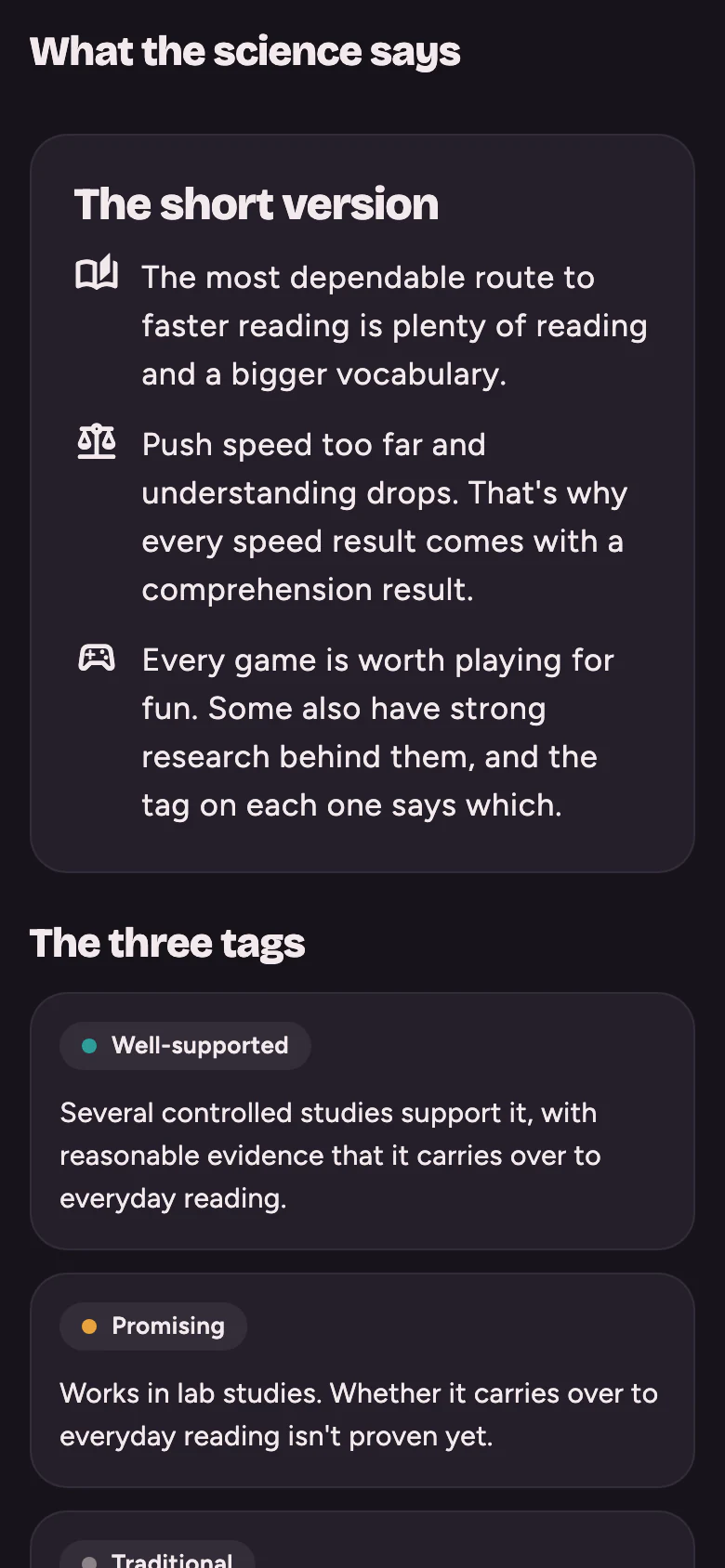
  • Well-supported

    Several controlled studies support it, with reasonable evidence that it carries over to everyday reading.

  • Promising

    Works in lab studies. Whether it carries over to everyday reading isn’t proven yet.

  • Traditional

    A classic attention game with little evidence that it changes everyday reading. Play it because it’s fun.

A tag measures research support, not fun. Tap any game in the app to read exactly what the research says.

Things we won’t claim

  • “Read three times faster.” Big speed jumps usually cost understanding. Xoreader helps you find your best honest pace and grow it gradually.
  • “Expand your peripheral vision.” Your retina doesn’t change. Schulte tables train visual search and attention, which is plenty.
  • “Silence your inner voice.” Inner speech supports comprehension and memory, so Xoreader doesn’t sell a cure for it.
  • Anything medical. Xoreader isn’t a treatment for any condition.
“Timed and repeated reading are the best-supported ways to build reading fluency.”What the science says, in the app
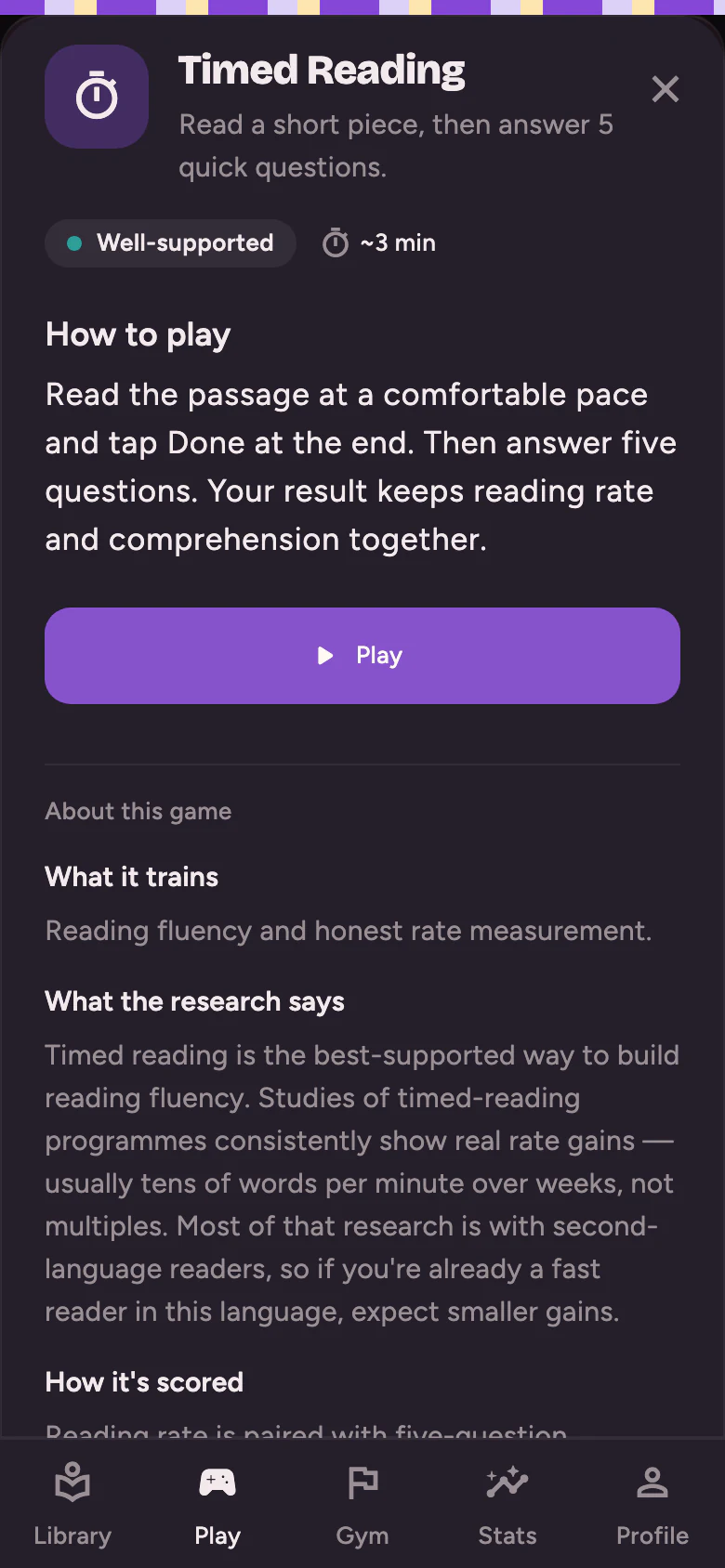
Timed Reading's intro sheet in the dark Deep theme: a Well-supported tag, about three minutes per round, how to play, a Play button, and a section called What the research says with the evidence text.
Each game’s intro sheet says what it trains and what the research says.
The What the science says screen in the Deep theme, opening with The short version and The three tags.
“What the science says” is free. Reading it to the end earns a medal.
The research behind the tags

Xoreader’s evidence notes lean most on Rayner, Schotter, Masson, Potter and Treiman’s 2016 review of how reading works and whether speed reading helps. The full list, as shown in the app:

  1. Bernard, J.-B., Arunkumar, A., & Chung, S. T. L. (2012). Can reading-specific training stimuli improve the effect of perceptual learning on peripheral reading speed? Vision Research, 66, 17–25.
  2. Chang, A. C.-S. (2010). The effect of a timed reading activity on EFL learners. Reading in a Foreign Language.
  3. Chang, A. C.-S., & Millett, S. (2013). Improving reading rates and comprehension through timed repeated reading. Reading in a Foreign Language, 25(2), 126–148.
  4. Chang, A. C.-S., & Millett, S. (2015). Improving reading rates and comprehension through audio-assisted extensive reading for beginner learners. System, 52, 91–102.
  5. Chung, S. T. L., Legge, G. E., & Cheung, S.-H. (2004). Letter-recognition and reading speed in peripheral vision benefit from perceptual learning. Vision Research, 44, 695–709.
  6. Chung, M., & Nation, I. S. P. (2006). The effect of a speed reading course. English Teaching.
  7. Edwards, J. D., et al. (2017). Systematic review and meta-analyses of useful field of view cognitive training. Neuroscience & Biobehavioral Reviews.
  8. Kuperman, V., & Van Dyke, J. A. (2011). Effects of individual differences in verbal skills on eye-movement patterns during sentence reading. Journal of Memory and Language.
  9. LaBerge, D., & Samuels, S. J. (1974). Toward a theory of automatic information processing in reading. Cognitive Psychology, 6, 293–323.
  10. Lee, H.-W., Kwon, M., Legge, G. E., & Gefroh, J. J. (2010). Training improves reading speed in peripheral vision: Is it due to attention? Journal of Vision.
  11. Rayner, K., Liversedge, S. P., & White, S. J. (2006). Eye movements when reading disappearing text. Vision Research.
  12. Rayner, K., Schotter, E. R., Masson, M. E. J., Potter, M. C., & Treiman, R. (2016). So much to read, so little time: How do we read, and can speed reading help? Psychological Science in the Public Interest, 17(1), 4–34.
  13. Schotter, E. R., Tran, R., & Rayner, K. (2014). Don’t believe what you read (only once): Comprehension is supported by regressions during reading. Psychological Science.
  14. Snell, J. (2024). No, Bionic Reading does not work. Acta Psychologica.
  15. Willis, S. L., et al. (2006). Long-term effects of cognitive training on everyday functional outcomes in older adults (ACTIVE). JAMA, 296(23).
  16. Yu, D., Cheung, S.-H., Legge, G. E., & Chung, S. T. L. (2010). Reading speed in the peripheral visual field of older adults: Does it benefit from perceptual learning? Vision Research, 50, 860–869.
Gym and progress

A little structure, if you want it.

Gym suggests a few optional missions each day. Finish them for XP, climb ten ranks named after the axolotl life cycle, from Egg to Ancient Axolotl, and fill a medal case. Or skip all that and just play.

  • Kind streaks. A freeze covers a missed day automatically, and you hear about it afterwards, not in a panic.
  • No guilt trips. No streak-loss warnings, no countdowns, and nothing to buy back.
  • One reminder, tops. A single local reminder a day, off until you switch it on.
  • Permission to stop. After a big day Xoreader says so: “That’s a good day’s work. More isn’t better with this stuff — come back tomorrow.”
  • No pay-to-win. XP can’t be bought. Pro adds games and tools, never progress.

And yes, there’s a medal for reading “What the science says” all the way to the end.

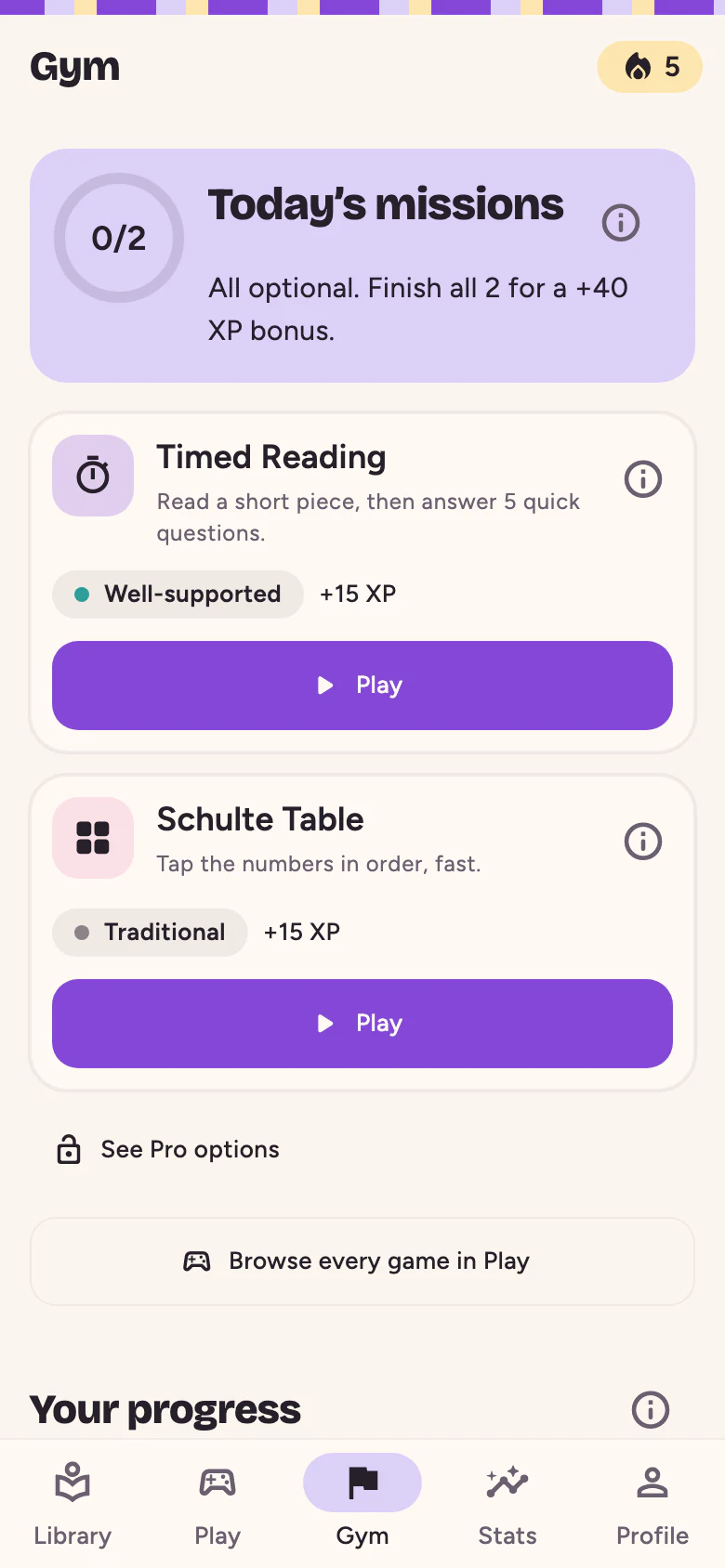
The Gym tab: Today's missions, marked all optional, with a Timed Reading mission and a Schulte Table mission, each showing its evidence tag and XP reward.
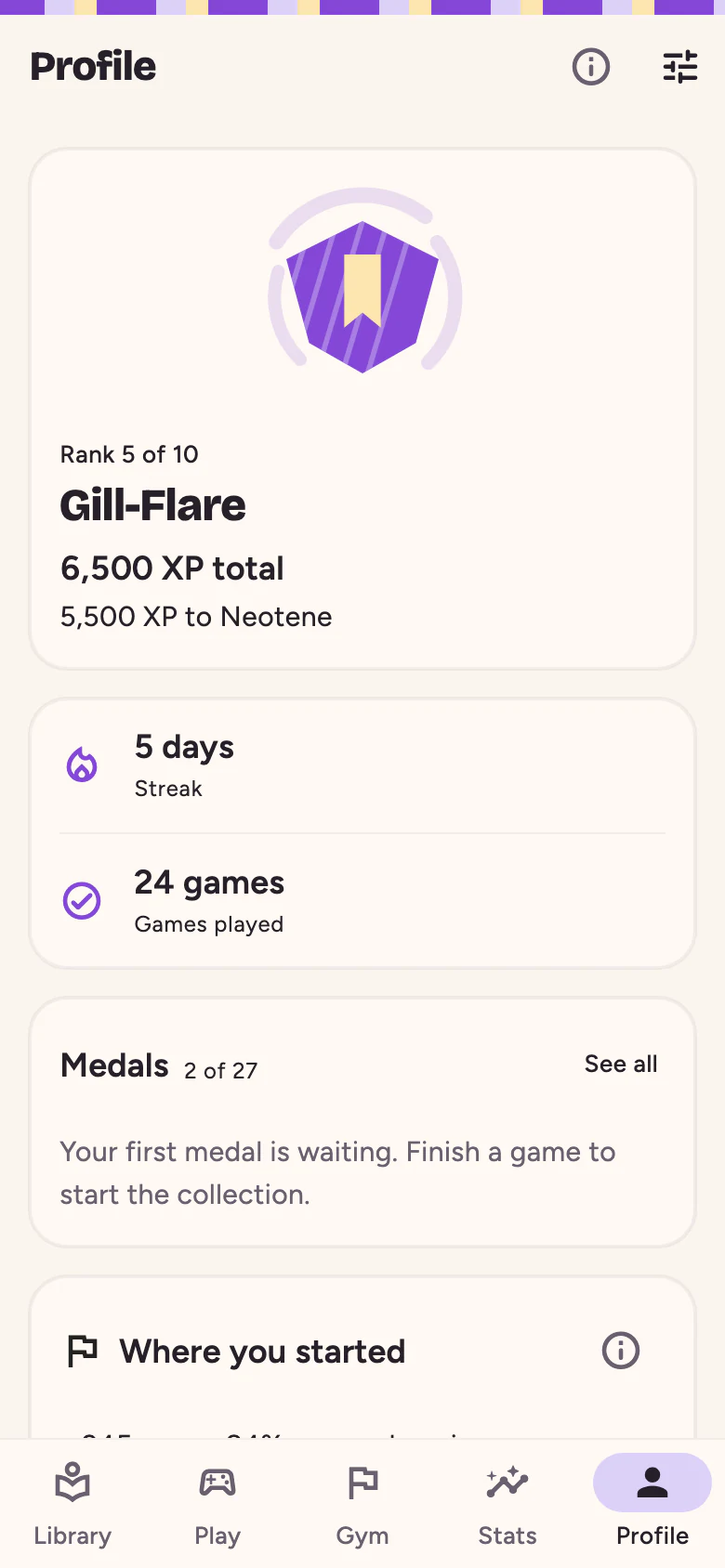
The Profile tab with a rank badge for Gill-Flare, rank 5 of 10, a five-day streak, games played and the medal shelf.
Gym and Profile, with sample progress.
Free · and Xoreader Pro

Free to read and play. Pro for the whole shelf.

The free app is a real app, not a trial. Pro adds breadth, with more books, every game in full and more reading tools. It never sells progress.

Xoreader Free $0for as long as you like
  • Two books in your library at a time
  • Guided Highlight, Classic, and RSVP up to 400 wpm
  • Timed Reading and Scan Hunt once a day
  • Word Sprint in 30-second rounds, and 10 Word Bank cards a day
  • Schulte Table in its classic style, 3 × 3 to 5 × 5
  • Color Sort and Category Sort, as much as you like
  • One full preview of every other game
  • Missions, XP, ranks, streaks and every medal
  • Your last 14 days of history

No ads, no account and no time limit.

Always free, on every plan: evidence tags, “What the science says”, Gentle mode and every accessibility setting. Safety and honesty are never behind a paywall.

Subscription terms

  • What it is. Xoreader Pro is an auto-renewing subscription that unlocks the Pro features listed above. The monthly and yearly plans unlock exactly the same things.
  • Length and price. One month at US$3.99 or one year at US$34.99 on the US App Store. The App Store shows your localized price, including any tax, before you confirm.
  • Payment and renewal. Payment is charged to your Apple Account when you confirm. The subscription renews automatically unless you cancel at least 24 hours before the current period ends, and the renewal is charged within the 24 hours before it ends.
  • Managing and cancelling. Manage or cancel any time in your Apple Account’s subscription settings, or from Settings → Subscription in Xoreader. Deleting the app doesn’t cancel a subscription.
  • Restoring. Restore purchases, on the Pro screen and in Settings, brings Pro back on any iPhone signed in to the same Apple Account.
Privacy

Your reading stays yours.

Xoreader works without an account, ads or tracking. Your books and your history live in the app’s private storage on your iPhone, and they don’t leave unless you send them somewhere yourself.

On your iPhone

Books, articles, reading progress, game history, medals and settings are stored on your device. There’s no Xoreader account and no cloud copy.

Nobody watching

No ads, no third-party analytics, no crash reporting and no tracking across other apps or websites.

Online only on purpose

Importing a link fetches that page, or those captions, once. Subscriptions go through the App Store and RevenueCat under a random ID, never your name.

The short version

What stays on your device

Your library and everything imported into it, reading positions and sessions, game results, levels, personal bests, XP, streaks, medals, Word Bank cards and settings.

What leaves your device

Subscription checks and purchases through RevenueCat and Apple, and the request to a page or YouTube video you choose to import. Nothing else.

What Xoreader never does

No account, advertising, analytics, crash reporting, cross-app tracking or sale of personal data, and no server copy of your reading to lose or hand over.

Read the full Privacy Policy See what each service receives →

Good questions

Before you start.

The short version: Xoreader is for people who want to read more and enjoy the practice, without being fed a speed fantasy.

Is Xoreader out yet?

It’s coming soon to the App Store for iPhone. The download link will appear on this page as soon as the listing is live. An Android version is planned as a separate release.

Will it make me read three times faster?

No, and be wary of anything that promises it will. Big speed jumps usually cost understanding. Xoreader helps you find your real reading speed, the one where you still understand the page, and nudge it up gradually.

What can I read in it?

EPUB (versions 2 and 3) and TXT files, pasted text, web articles, blog posts and news pages, and YouTube videos that have captions. Copy-protected (DRM) books, PDF, MOBI and AZW files aren’t supported.

Does it work offline?

Yes. Once something is in your library, reading and every game work without a connection. Importing a link needs one, and so do buying and restoring Pro.

Do I need an account?

No, there’s nothing to sign up for. Pro belongs to your App Store account, and Restore purchases brings it back on another iPhone. Your reading data stays on the iPhone where you created it.

What if flashing images bother me?

Some games flash text or shapes quickly, so Xoreader shows a health notice before any of them can start. Gentle mode caps rapid reading at 500 wpm, uses soft fades and lowers contrast, and it turns on automatically with your iPhone’s Reduce Motion setting. If you have photosensitive epilepsy or are prone to migraines, please check with a doctor before playing those games.

Is it a treatment for dyslexia or ADHD?

No. Xoreader is a reading app with games, not a therapy, and it makes no medical claims. If Gentle mode, larger text or a different reading font makes reading more comfortable for you, those are all free.

Which languages does it speak?

English, Brazilian Portuguese and Spanish. The app’s reading passages and word games come in all three.

A small studio, listening

Need a hand?

Tell us what happened and which iPhone and iOS version you’re using. A person reads every message.

Open the support page Email us